Vendor Identification (VID) Section
About
The Vendor Identification (VID) Section is responsible for the maintenance of the Vendor Identification System. Electronic documents, *DEFINE GGVs, initiated at the departmental level are used to establish a VID or make changes to an existing VID. All GGV documents are reviewed and verified with various State of Texas Systems. All vendors classified as individuals, sole proprietors and partnerships, must complete a Payee Identification Form (PIF) before payment can be made.
Forms
- PIF DocuSign PowerForm: https://docusign.utexas.edu/PIF (EID+Duo required).
- Alternatively, UT Departmental Contacts can download and send the Payee Information Form (PIF) (Substitute W-9 Form)
- When the interactive PIF is completed, have the payee/vendor upload the completed document via the UTBox Upload Widget.
- PIF Instructions (below)
- UT Departmental Contacts should launch the EFT DocuSign PowerForm (All non-student and non-employee payees/vendors): https://docusign.utexas.edu/direct-deposit (EID+Duo required)
- EFT Checklist
- If a vendor is NOT currently in DEFINE, ensure that a GGV has been created and approved before you provide the final signature approval for the PIF or DDA to the VID section
- Please ensure that a vendor completes their PIF using EITHER the Powerform, OR via PDF PIF form using the upload widget. Submitting a PIF via both methods will create errors and cause a duplication of efforts by the VID section team.
PIFs may be submitted by scanning and uploading via the UTBox Upload Widget. (Note: PIFs or EFTs will not be accepted by email. Please use the following nomenclature to name your file: [First/Last Name or Company Name] - [Document Type] - [GGV] (if known) i.e.: John Doe - PIF - K0GGV010101.)
GGV Tips from the Vendor ID Section
Name Info
The primary name is the name on IRS records for that number. Individuals are entered "last name, first name, middle initial or name, Jr or III". William Paul Jones Jr would be "Jones, William Paul, Jr".
Company names are listed without using “the” at the beginning. The John Smith Corp would be “John Smith Corp, The".
Don't use periods in the primary name field. Vidinfo.com would be "vidinfo com".
The other name line is for names that might help in finding the vendor on the GG3 screen.
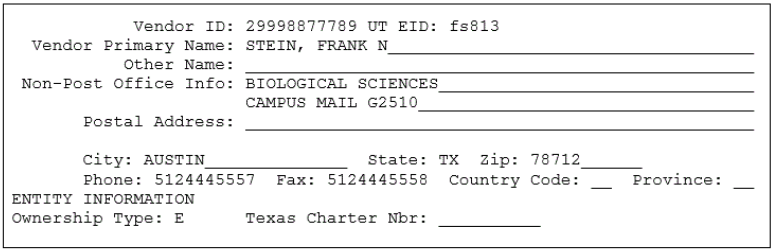
Campus Address Format
Format campus addresses to match the HD8 screen and use zip code 78712. Campus addresses are for employees only.
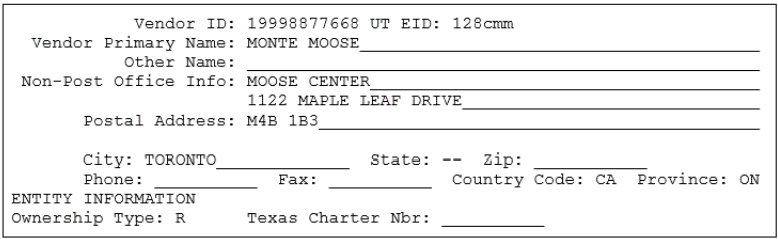
Foreign Address Format (Canadian)
Enter the street address in the Non-Post Office Info field, the postal code in the Postal Address field, and the city in the City field. Enter two hyphens ("--") in the State field and leave the Zip field blank. Enter “CA” for Country Code. Enter a question mark in the Province field to find the correct abbreviation for a Canadian province.
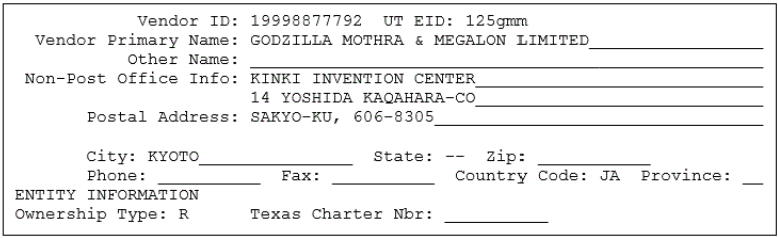
Foreign Address Format (non-Canadian)
Enter the street address in the Non-Post Office Info field, the province and postal code in the Postal Address field, and the city in the City field. Enter two hyphens ("--") in the State field and leave the Zip field blank. Enter a question mark in the Country Code field to find the correct abbreviation for that country. Leave the Province field blank.
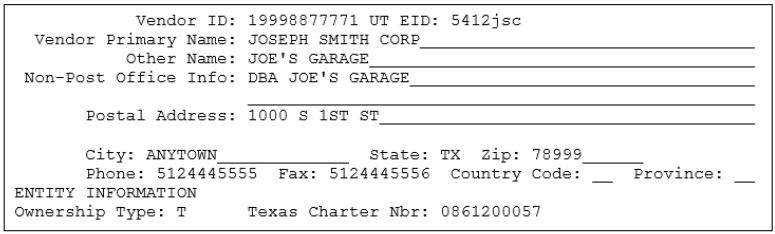
Sole-Owner Name & SSN Format
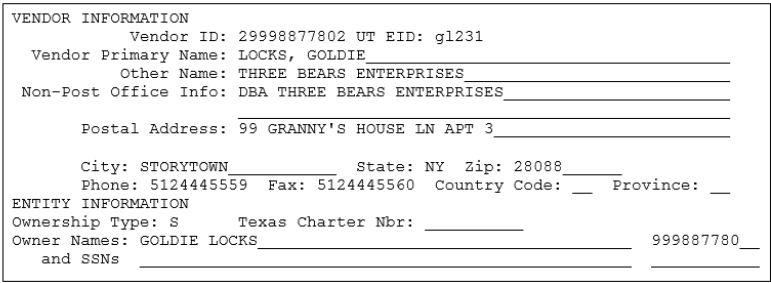
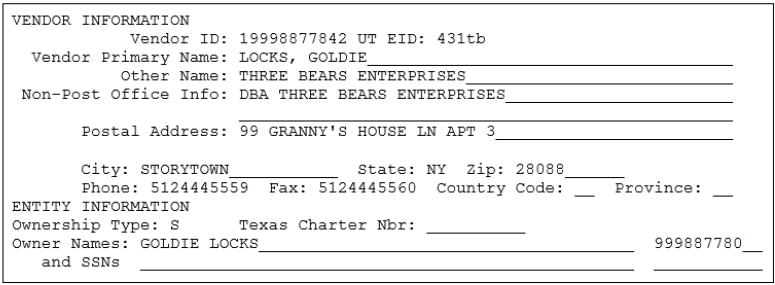
Sole-Owner Name and FEIN Format
Ms. Locks may be paid using her federal employer identification number (FEIN) if she chooses.
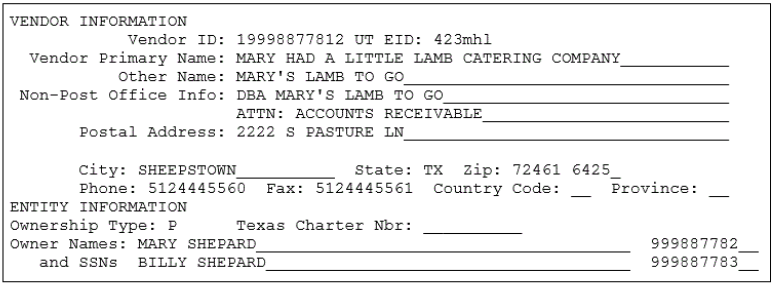
Partnership Format
Temporary VID
Temporary Vendor IDs can be assigned for:
- Foreign companies.
- Refunds or reimbursements for individuals that do not have a social security number.
- Services provided outside of the United States by individuals that do not have an SSN.
- Refunds for individuals that refuse to provide their SSNs.
If paying a non-resident alien without an SSN for services provided in the U.S., contact the Independent Contractor/Tax Section of Financial Accounting and Reporting via oa.ic@austin.utexas.edu when the GGV is submitted to discuss obtaining an individual taxpayer identification number (ITIN). The Independent Contractor Section will then e-mail the VID Section, allowing a temporary VID to be used until the ITIN is issued.
Ownership Codes Reference List
*This ownership type requires the Texas Charter Number be filled in. Please contact the State of Texas Secretary of State’s Office for more information regarding the Texas Charter Number.
| Internal Revenue Service ownership description | Ownership type | State of Texas (UT) ownership description |
|---|---|---|
LIMITED LIABILITY CORP (TEXAS) NON-PROFIT CORP (TEXAS) PROFIT CORP (TEXAS) | T* | TEXAS CORPORATION - The VID# is created using the federal employer identification # for the corp preceded by a "1". The Texas charter # is required. |
| PROFESSIONAL ASSOCIATION (TEXAS) | A* | PROFESSIONAL ASSOCIATION - The VID# is created using the federal employer identification # for the professional assoc preceded by a “1”. The Texas charter # is required. |
| PROFESSIONAL CORPORATION (TEXAS) | C * | PROFESSIONAL CORPORATION - The VID# is created using the federal employer identification # for the professional corp preceded by a "1". The Texas charter # is required. |
PROFIT CORP (OUT OF STATE) LIMITED LIABILITY CORP (OOS) NON-PROFIT CORP (OUT OF STATE) | O | OUT OF STATE CORPORATION - The VID# is created using the federal employer identification # for the corp preceded by a "1".
|
| ESTATE (TEXAS & OUT OF STATE) INDIVIDUAL (TEXAS & OUT OF STATE) | I | INDIVIDUAL - The VID# is created using the social security # of the individual preceded by a "2". |
| SOLE-OWNER (TEXAS & OUT OF STATE) | S
| SOLE-OWNER - The VID# is created using the federal employer identification # for the sole-owned business preceded by a "1" or the owner's social security # preceded by a "2". The owner name and social security # is required. Single member LLCs owned by an individual must be paid using their social security number. |
| STATE EMPLOYEE | E | EMPLOYEE of UT - The VID# is created using the social security # of the individual preceded by a "2". |
GENERAL PARTNERSHIP (TEXAS & OOS)
| P | PARTNERSHIP - The VID# is created using the federal employer identification # for the general partnership preceded by a "1". Two owner names are required and an ss # if they are an individual and an fei # if they are a business. |
| FOREIGN COMP ANY (OUT OF USA ) | R | FOREIGN COMPANIES - Temporary #s are used for companies located outside the United States |
LIMITED PARTNERSHIP (TEXAS & OOS) LTD LIABILITY PARTNERSHIP (TX & OOS) REGULAR ASSOCIATION (TEXAS & OOS) INSURANCE CORP (TEXAS & OOS) RAILROAD (TEXAS & OOS) OIL AND GAS SPECIAL (TEXAS & OOS) TRUST (TEXAS & OUT OF STATE) | N | OTHER - The VID# is created using the federal employer identification # preceded y a "1".
|
| LLC THAT FILES AS A PARTNERSHIP (TEXAS & OOS) | N | PARTNERSHIP - The VID# is created using the federal employer identification # for the general partnership preceded by a "1". TWO OWNER NAMES AND TAXPAYER NUMBERS ARE NOT REQUIRED |
CITY (TEXAS & OUT OF STATE) COUNTY (TEXAS & OUT OF STATE) SCHOOL DISTRICT (TEXAS & OUT OF STATE) MASS TRANSIT (GOVT OWNED) (TX & OOS) RAPID TRANSIT (GOVT OWNED) (TX & OOS) SPECIAL PURPOSE DISTRICT (TX & OOS) LOCAL OFFICIAL (TX & OOS) FEDERAL AGENCY (TX & OOS) STATE AGENCY (OUT OF STATE) | G | GOVERNMENT ENTITY - The VID# for governmental entities is created using the federal employer identification # for the entity preceded by a "1".
|
COMMUNITY COLLEGE (TEXAS & OUT OF STATE) JUNIOR COLLEGE (TEXAS & OOS) STATE COLLEGE/UNIV (TEXAS & OOS) STATE AGENCY (TEXAS)
| U | STATE AGENCY/UNIVERSITY - The VID#s for state agencies of Texas are created using the state agency # assigned by the State Comptroller's Office. The VID# starts with a "3" and is followed by the state agency # repeated three times. The University of Texas at Austin is state agency "721". The VID# is 37217217217. -The VID# for state agencies in the USA not in Texas is created using the federal employer identification # for the state agency preceded by a "1". |
BANK (TEXAS & OUT OF STATE) CREDIT UNION (TEXAS & OUT OF STATE) S& L (TEXAS & OUT OF STATE) LTD LIABILITY BANK ASSOC (TEXAS & OOS) | F | FINANCIAL INSTITUTIONS – The VID# is created using the federal employer identification # for the financial institution preceded by a "1".
|
PIF Instructions
Purpose of Form: The University of Texas must obtain your correct Taxpayer Identification Number (TIN) because federal law requires the university to report certain payments to the Internal Revenue Service. Additionally, the State of Texas requires the university to collect certain other information on United States entities to satisfy state law requirements.
Specific Instructions
Section A: Contact Information
Line 1 - Refer to line 1 under Specific Instructions for IRS Form W-9 instructions https://www.irs.gov/pub/irs-pdf/fw9.pdf for detailed instructions
Line 2 - Refer to line 2 under Specific Instructions for IRS Form W-9 instructions https://www.irs.gov/pub/irs-pdf/fw9.pdf for detailed instructions
Line 3 - If known, enter UT EID
Line 4 - Enter your mailing address (number, street, and apartment or suite number; City; State or Province; Zip or Foreign Postal Code). This is where the requester of this Form W-9 will mail your information returns.
Line 5 - Enter your mailing address country
Line 6 - Enter your permanent address (number, street, and apartment or suite number; City; State or Province; Zip or Foreign Postal Code). This is optional and should be completed if different from mailing address in line 4.
Line 7 - Enter your permanent address country if line 6 was completed
Line 8 - Enter your contact email address
Line 9 - Enter birth date/formation date
Line 10 - Enter contact phone number
Line 11 - United States individuals/entities only. Refer to line 4 under Specific Instructions for IRS Form W-9 instructions https://www.irs.gov/pub/irs-pdf/fw9.pdf for detailed instructions.
Line 12 - Historically Underutilized Businesses (HUB): The State of Texas encourages state agencies like the University to utilize HUB. If you are a United States individual or entity, you or your firm qualifies if 51% owned by a person or persons who have been historically underutilized because of their identification as a member of certain groups: Black Americans, Hispanic Americans, Asian-Pacific Americans, Native Americans, or Women-any ethnicity. Inquiries concerning HUB certification should contact the UT Austin HUB/SB Program at hub@austin.utexas.edu, 512-471-2851.
Line 13 - Enter the name and email address of the person at UT Austin with whom you are conducting business.
Section B: Status
Select only one box based on the Name provided in Section A, line 1:
- If the box for United States Individual/Sole Proprietor/Permanent Resident/Legal Entity is selected, then complete sections A, B, C, D & E of page 1 of the PIF. There is no need to complete the following pages of the IRS Form W-8BEN nor IRS Form W-8BEN-E.
- If foreign individual box is selected after completing sections A, B and C of page 1 of the PIF, then complete page 2 of the PIF for the IRS Form W-8BEN. For detailed assistance to complete Form W-8BEN, go to Form W-8 BEN instructions as listed on https://www.irs.gov/pub/irs-pdf/iw8ben.pdf (Note: A readable scan of your government issued ID such as Passport or Driver’s License is required. Also, if you have been issued a U.S. SSN and/or EAD Card, provide a scanned copy of these documents.)
- If foreign entity box is selected after completing sections A, B, and C of page 1 of PIF, then complete pages 3 and 4 of PIF for the IRS Form W-8 BEN-E. For detailed assistance to complete Form W-8 BEN-E, go to Form W-8 BEN-E instructions as listed on https://www.irs.gov/pub/irs-pdf/iw8bene.pdf
Section C: Taxpayer Identification number (TIN)
The correct TIN depends on the federal tax status of the Payee and may be either a Social Security Number (SSN) that has been issued by the Social Security Administration, Employer Identification Number (EIN) or, for foreign individuals residing but not working inside the United States, an Individual Taxpayer Identification Number (ITIN). A foreign individual residing outside the United States without a SSN or ITIN may provide the Foreign Tax Number issued by the individual’s country of citizenship or permanent residency. A foreign entity without a United States issued Employer Identification Number (EIN) may provide the Foreign Tax Number issued by the entity’s country of organization or incorporation.
To prevent payments from being subject to backup withholding, you must provide a correct Taxpayer Identification Number (TIN) in the appropriate box listed. A TIN is considered incorrect if the name and TIN combination does not match or cannot be found on IRS or Social Security Administration (SSA) records. Exemptions: See https://www.irs.gov/pub/irs-pdf/fw9.pdf for detailed instructions. If you elect to provide the incorrect TIN or no TIN, then federal law requires UT to pay 76% of the amount owing to you and 24% directly to the US Treasury, on your behalf.
Disclosure of your Social Security number is required and will be used to help the Texas Comptroller of Public Accounts administer the state's tax laws and for other purposes. See Op Tex. Att'y Gen. No. H-1255 (1978). This disclosure requirement has been adopted under the Federal Privacy Act of 1974 (5 U.S.CA sec. 552a(note)(West 1977), the Tax Reform Act of 1976 (42 U.S.CA sec. 405(c)(2)(C) (West 1992), TEX. GOVT CODE ANN. sec . 403.055 (Vernon 2005) and TEX. GOVT CODE ANN. sec. 403.056 (Vernon 2005).
Section D: Ownership Code
United States individuals/entities only. Please check only one box next to the appropriate ownership code that applies to you or your business and enter additional information as requested in this section. The Secretary of State's office may be contacted at 512-463-5555 for information regarding Texas file numbers.
Individual Recipient and Sole Proprietor must provide a scanned image of social security card or government issued ID (Driver’s License or Passport).
Disregarded LLCs owned by a single individual must provide the SSN of the sole owner in Section C and a scanned image of sole owner’s social security card or government issued ID (Driver’s License or Passport).
Disregarded LLCs owned by a single entity must provide the EIN of the sole owner entity in Section C.
Section E: US Certification
Before signing, be sure to answer the question: Has the IRS notified you that you are currently subject to backup withholding? If you answer “Yes” then you must cross out item #2 in the Certification.
Contacts
Physical Location Campus Mail Email (For correspondence only, attachments not accepted) | Numbers U.S. Mail Office Hours |