

How To
Pick Up Checks
For All Check Pick Up in Person
Accounts Payable
Check Distribution Code "P"
(either by the payee or by university personnel)
All documents with a check distribution code of "P" must be approved by the appropriate processing office in Payment Services or Accounting and Financial Management-Independent Contractors prior to final approval of the voucher payment document (VPM) in *DEFINE. The purpose of this method of check distribution will allow the vendor-payee and/or a University employee to physically pick up the check. However, recognizing the inherent risk associated with this method of check distribution, the following procedures have been established to safeguard The University from possible fraud and misappropriation of funds. It is important to keep in mind that more stringent procedures, including advanced written approval, apply when someone other than the payee listed on the check is requesting authorization to pick up the check.
The department making the payment must determine who will pick up the check when the check is issued. The person picking up the check is either:
- The payee or
- Someone other than the payee (a third party)
For more guidance, see below.
Payee Will Pick Up Check
APPROVAL and GENERAL PROCEDURES
University Personnel may not pick up checks on behalf of a payee (individual or vendor) unless approved in writing. See Third Party Check Pick-Up Procedures below for further information.
If the payee will be picking up the check in person, then no written memo is required. However, the *DEFINE payment voucher document must include the information listed below prior to final approval.
Note: These requirements only apply to vouchers using code "P" for distribution.
- The Comments area of Section #1 of the *DEFINE payment voucher document (VPM) must state the words:
"PAYEE will pick up" or "DEPARTMENT will pick up" to distinguish whether the check will be picked up by either the payee (individual or vendor) or by a University Department (employee) representative in lieu of the payee. - The Comments area of Section #1 of the *DEFINE payment voucher document (VPM) should also state the name and phone number of the person who needs to be notified once the check is ready for pick up.
All checks issued with the Check Distribution Code "P" may be picked up from
Accounting and Financial Management, Main Building, room 132.
Third Party Will Pick Up Check
The procedures stated below apply when a department is requesting authorization to pick up a check. They do not apply when the payee (vendor or individual) picks up the check.
University personnel may not pick up checks for vendors unless all the steps listed below are complete. The following procedures have been established to ensure checks are issued in a timely manner and to help safeguard University funds against possible fraud or loss.Please note that requesting check pickup greatly increases the cost of processing a payment and should only be used when absolutely necessary.
- When processing the *DEFINE payment voucher document (VPM), the Comments field in Section 1 must include:
- "PAYEE will pick up" or "DEPARTMENT will pick up" to indicate that the check will be picked up by a University department (employee) representative.
- The name and phone number of the person to be notified when the check is ready for pick up.
- When a department requests authorization for a University employee to pick up the check on behalf of the vendor (payee), a written memo containing all the elements listed below must be attached to the payment voucher support documentation and submitted to Accounting and Financial Management Document Processing – K6000.
- signature from a unit head or director who is authorized to sign for the account used for payment, a University Business Officers Council (UBOC) member, an associate/assistant director in the department, or a person of higher authorization from the account that the payment will be made on;
- note stating “Attention: Assistant Director of Payment Services;”
- business reason stating why the check must be picked up by departmental personnel;
- name and phone number of the person who should be contacted when the check is ready for pick up;
- payment voucher document ID; and
- the name of the vendor (payee).
Once the request has been approved by the department and all the necessary supporting documentation received by Payment Services or Accounting and Financial Management-Independent Contractors, the payment voucher will process normally.
All checks issued with the Check Distribution Code "P" may be picked up from Accounting and Financial Management, Main Building (MAI), room 4. Phone: 512-471-3723.
Note: The Office of the Vice President and Chief Financial Officer will perform and document quarterly reviews of check pickup activity.
Which Voucher Form? VPM Quick Reference Guide
| Which Voucher Form ? | ||||||
|---|---|---|---|---|---|---|
| VP1 / VP2 | VP1/VP2 non-employee independent contractor payments | VP3 | VP5 | VPE | ||
| Check Total Amount | Less than $1000 | Greater than $1000 | All | All | All | All |
| Who is the Processing Office? | Department | Accounts Payable | Independent Contractor Desk | Accounts Payable | Travel Desk | Accounts Payable |
| Where do we send the paperwork/VTF? | K-6000 OA-Document Processing | K-6000 OA-Document Processing | K-6000 OA-Document Processing | K-6000 OA-Document Processinge | K-6000 OA-Document Processing | K-6000 OA-Document Processing |
| Is a VTF Required? | Yes | Yes | Yes | No | No | No |
| Is a written Memo Required for Check Pick Up ? | ||||||
| The Payee will pick up check | No | No | No | No | No | No |
| Third Party (someone other than Payee) will pick up check | Yes | Yes | Yes | Yes | Yes | Yes |
Partial List of Check Distribution Codes
- Check Distribution code will default to "U" on voucher documents for regular US mail distribution.
- Check Distribution Code "T" is reserved for checks which require additional paperwork/documentation to be sent along with the check to the payee.
- Check Distribution Code "P" is reserved for checks which are issued to a payee but for whom the physical check will be picked up from the Main Building, Room 132 in person.
Frequently Asked Questions
Why do I need the "written request"?
In the spring of 1994 The University adopted the policy of not releasing checks to departmental offices except in unusual and justifiable cases. The policy was adopted in response to cases where funds were misappropriated and is designed to help safeguard University funds. The written request documents the conditions requiring that departmental personnel pick up the check and ensures compliance with University policy.
To whom do I send the "written request"?
Cynthia A Gregg, Assistant Director of Payment Services
Where do I send the "written request"?
The request needs to be attached to the Voucher Transmittal Form (VTF) or voucher documentation appropriate for the specific *DEFINE document form. This documentation is mailed to the appropriate processing office. See VPM chart (above) for list of where to mail the written request and voucher documentation.
Is check pick-up for Vendor Payee checks only, or does "P" code also work for checks issued to individuals where someone other than the payee will be picking up the check?
"P" indicates that the check will be picked up by the Payee or a department representative.
When can someone pick up the check? The request should be attached to the VTF and mailed with all other supporting documentation. After the electronic document has final approval and the check has been issued/printed, the department will be notified when the check is available for pickup Normal office hours for check pick up is 9:00am to 4:00pm Monday through Friday except on University holidays.
Additional Information
Additional detailed information regarding the Voucher Transmittal Form and where to send your paperwork for processing voucher payment documents (VPM) in *DEFINE is available from the Accounts Payable web page.
General information regarding the Post Payment Audit guidelines under "Special Processing Issues" and the Prompt Payment Act can also be found from the Accounts Payable web page.
GGV Documents
GGV Tips
Name Info
The primary name is the name on IRS records for that number. Individuals are entered "last name, first name, middle initial or name, Jr or III". William Paul Jones Jr would be "Jones, William Paul, Jr".
Company names are listed without using “the” at the beginning. The John Smith Corp would be “John Smith Corp, The".
Don't use periods in the primary name field. Vidinfo.com would be "vidinfo com".
The other name line is for names that might help in finding the vendor on the GG3 screen.
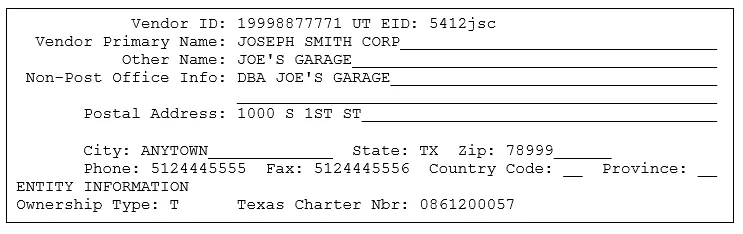
Campus Address Format
Format campus addresses to match the HD8 screen and use zip code 78712. Campus addresses are for employees only.
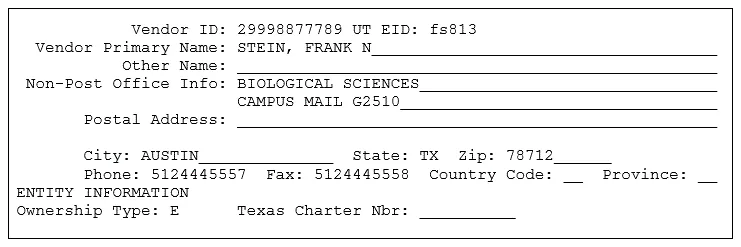
Foreign Address Format (Canadian)
Enter the street address in the Non-Post Office Info field, the postal code in the Postal Address field, and the city in the City field. Enter two hyphens ("--") in the State field and leave the Zip field blank. Enter “CA” for Country Code. Enter a question mark in the Province field to find the correct abbreviation for a Canadian province.
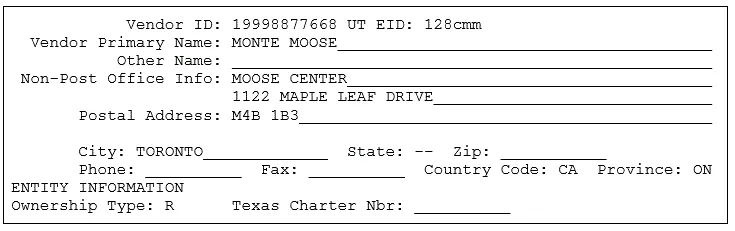
Foreign Address Format (non-Canadian)
Enter the street address in the Non-Post Office Info field, the province and postal code in the Postal Address field, and the city in the City field. Enter two hyphens ("--") in the State field and leave the Zip field blank. Enter a question mark in the Country Code field to find the correct abbreviation for that country. Leave the Province field blank.
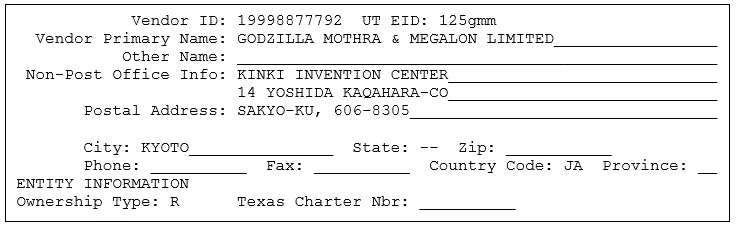
Sole-owner Name & SSN Format
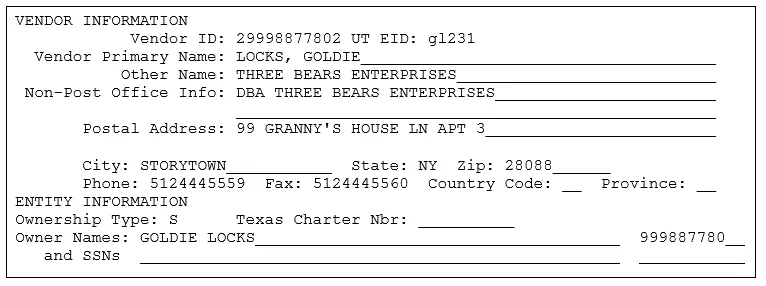
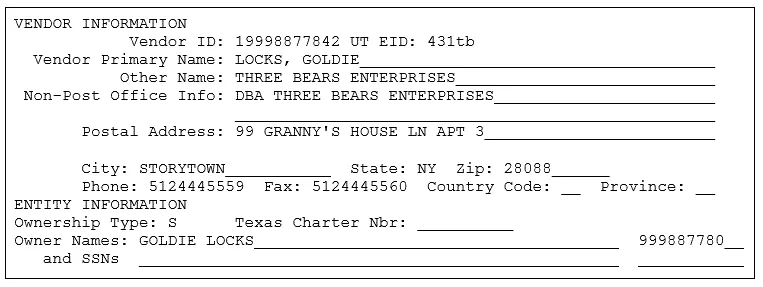
Sole-Owner Name and FEIN Format
Ms. Locks may be paid using her federal employer identification number (FEIN) if she chooses.
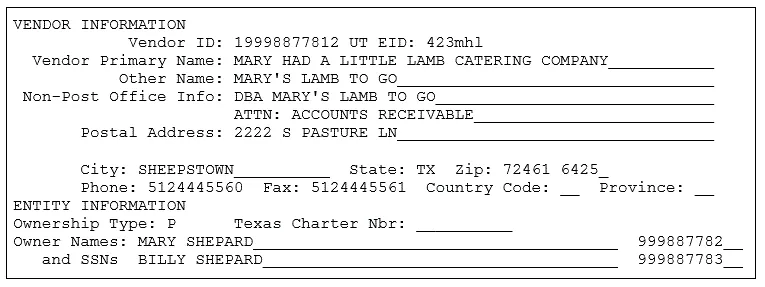
Partnership Format
Temporary VID
Temporary Vendor IDs can be assigned for:
- Foreign companies.
- Refunds or reimbursements for individuals that do not have a social security number.
- Services provided outside of the United States by individuals that do not have an SSN.
- Refunds for individuals that refuse to provide their SSNs.
If paying a non-resident alien without an SSN for services provided in the U.S., contact the Independent Contractor/Tax Section of Financial Accounting and Reporting via oa.ic@austin.utexas.edu when the GGV is submitted to discuss obtaining an individual taxpayer identification number (ITIN). The Independent Contractor Section will then e-mail the VID Section, allowing a temporary VID to be used until the ITIN is issued.
Ownership Codes Reference List
| Internal Revenue Service ownership description | Ownership type | State of Texas (UT) ownership description |
LIMITED LIABILITY CORP (TEXAS) NON-PROFIT CORP (TEXAS) PROFIT CORP (TEXAS) | T* | TEXAS CORPORATION - The VID# is created using the federal employer identification # for the corp preceded by a "1". The Texas charter # is required. |
| PROFESSIONAL ASSOCIATION (TEXAS) | A* | PROFESSIONAL ASSOCIATION - The VID# is created using the federal employer identification # for the professional assoc preceded by a “1”. The Texas charter # is required. |
| PROFESSIONAL CORPORATION (TEXAS) | C * | PROFESSIONAL CORPORATION - The VID# is created using the federal employer identification # for the professional corp preceded by a "1". The Texas charter # is required. |
PROFIT CORP (OUT OF STATE) LIMITED LIABILITY CORP (OOS) NON-PROFIT CORP (OUT OF STATE) | O | OUT OF STATE CORPORATION - The VID# is created using the federal employer identification # for the corp preceded by a "1".
|
| ESTATE (TEXAS & OUT OF STATE) INDIVIDUAL (TEXAS & OUT OF STATE) | I | INDIVIDUAL - The VID# is created using the social security # of the individual preceded by a "2". |
| SOLE-OWNER (TEXAS & OUT OF STATE) | S
| SOLE-OWNER - The VID# is created using the federal employer identification # for the sole-owned business preceded by a "1" or the owner's social security # preceded by a "2". The owner name and social security # is required. Single member LLCs owned by an individual must be paid using their social security number. |
| STATE EMPLOYEE | E | EMPLOYEE of UT - The VID# is created using the social security # of the individual preceded by a "2". |
GENERAL PARTNERSHIP (TEXAS & OOS)
| P | PARTNERSHIP - The VID# is created using the federal employer identification # for the general partnership preceded by a "1". Two owner names are required and an ss # if they are an individual and an fei # if they are a business. |
| FOREIGN COMP ANY (OUT OF USA ) | R | FOREIGN COMPANIES - Temporary #s are used for companies located outside the United States |
LIMITED PARTNERSHIP (TEXAS & OOS) LTD LIABILITY PARTNERSHIP (TX & OOS) REGULAR ASSOCIATION (TEXAS & OOS) INSURANCE CORP (TEXAS & OOS) RAILROAD (TEXAS & OOS) OIL AND GAS SPECIAL (TEXAS & OOS) TRUST (TEXAS & OUT OF STATE) | N | OTHER - The VID# is created using the federal employer identification # preceded y a "1".
|
| LLC THAT FILES AS A PARTNERSHIP (TEXAS & OOS) | N | PARTNERSHIP - The VID# is created using the federal employer identification # for the general partnership preceded by a "1". TWO OWNER NAMES AND TAXPAYER NUMBERS ARE NOT REQUIRED |
CITY (TEXAS & OUT OF STATE) COUNTY (TEXAS & OUT OF STATE) SCHOOL DISTRICT (TEXAS & OUT OF STATE) MASS TRANSIT (GOVT OWNED) (TX & OOS) RAPID TRANSIT (GOVT OWNED) (TX & OOS) SPECIAL PURPOSE DISTRICT (TX & OOS) LOCAL OFFICIAL (TX & OOS) FEDERAL AGENCY (TX & OOS) STATE AGENCY (OUT OF STATE) | G | GOVERNMENT ENTITY - The VID# for governmental entities is created using the federal employer identification # for the entity preceded by a "1".
|
COMMUNITY COLLEGE (TEXAS & OUT OF STATE) JUNIOR COLLEGE (TEXAS & OOS) STATE COLLEGE/UNIV (TEXAS & OOS) STATE AGENCY (TEXAS)
| U | STATE AGENCY/UNIVERSITY - The VID#s for state agencies of Texas are created using the state agency # assigned by the State Comptroller's Office. The VID# starts with a "3" and is followed by the state agency # repeated three times. The University of Texas at Austin is state agency "721". The VID# is 37217217217. -The VID# for state agencies in the USA not in Texas is created using the federal employer identification # for the state agency preceded by a "1". |
BANK (TEXAS & OUT OF STATE) CREDIT UNION (TEXAS & OUT OF STATE) S& L (TEXAS & OUT OF STATE) LTD LIABILITY BANK ASSOC (TEXAS & OOS) | F | FINANCIAL INSTITUTIONS – The VID# is created using the federal employer identification # for the financial institution preceded by a "1".
|
*This ownership type requires the Texas Charter Number be filled in. Please contact the State of Texas Secretary of State’s Office for more information regarding the Texas Charter Number.
Payee Information Form
Handbook of Business Procedures forms page: https://afm.utexas.edu/resources/forms
Primary name for individuals and sole-owners will be the name on the picture ID or social security card copy provided with the Payee Information Form
Enlarging when copying helps ID copies fax clearly.
Instructions at top of form (Individuals complete part I & IV, Partnerships complete…).
Look at PIF for complete info before ending (signature, citizenship status of individuals and sole-owners, nonresident information, etc.).
If the name of an existing vendor changes, contact the VID Section via vid@austin.utexs.edu to have the name corrected. A new PIF is required when a vendor changes their name or citizenship status.
Internal Revenue Service form W-9
http://www.irs.gov/pub/irs-pdf/fw9.pdf
Payee Information Form is the University of Texas at Austin's version of an IRS W-9. A W-9 is acceptable in place of a PIF for all vendors except individuals, sole-owners and partnerships.
Direct Deposits & Wire Transfers
Electronic Funds Transfer (EFT) Authorization Form – Students Only.
Electronic Funds Transfer (EFT) Authorization Form – All other Vendors.
https://afm.utexas.edu/resources/forms
Direct deposits cannot be made to foreign banks.
Wire transfers - contact the Cash Management Section via oa.outgoing-wires@austin.utexas.edu because wire transfers require a VID number.
Employees and students can update their direct deposit information using UT Direct.
State mail code error message occurs when a VID number is used that has not been entered into the payee files of the State Comptroller's Office. Contact the VID Section via vid@austin.utexas.edu to have a state mail code assigned and info sent to the state. Please include document ID# in email message to VID Section.
When state funds are used for direct deposit and a state mail code error message is generated, a physical address must be given to the VID Section. The State Comptroller's Office must have a physical address to accompany the direct deposit info. It takes two weeks to establish a direct deposit on the State Comptroller's files. Payments issued by the state for two weeks after the direct deposit info is received will be by check and not direct deposit.
No ownership type error message occurs when an existing file does not have the ownership info. Contact the VID Section via vid@austin.utexas.edu to have the ownership info entered into the system.
PIF error message occurs when a vendor does not have a PIF on file and is being paid for services
State Holds
Vendors are sometimes placed on hold by the State Comptroller's Office. If a vendor is on hold, contact the VID Section via vid@austin.utexas.edu for information on why the vendor is on hold. The vendor is on hold if they have an asterisk (*) next to the name on the GG3 and GG4 screens.
Assignments
An assignment is when a company A (the assignor) sells (assigns) it Accounts Receivable to another company B (the assignee). The university does not accept assignments. Company A is paid using c/o company B as a mailing address.
Employees as Vendors
Per UTS159: Purchasing, Employees (or relative of an employed) can not be used as vendors Per HBP 7.7.2
IDT's
The university does not issue checks to itself. Contact Payment Information via paymentinfo@austin.utexas.edu to do an interdepartmental transfer of funds (IDT) when paying another department of the university.
Inactive VID numbers
Reactivate a vendor inactivated after 18 months of no activity by submitting a GGV document. If the vendor has a Payee Information Form on file, it will carry forward from the inactive file to the newly created file.
Submit Payment Voucher Documentation
Instructions
All payment voucher supporting documentation submitted to Accounting and Financial Management is scanned for permanent storage and retrieval. In order to expedite documentation scanning, persons who prepare payment vouchers should follow these document preparation guidelines:
- Print the Voucher Transmittal Form (VTF) using the PRT Action of the document. This form is attached to the TOP of the supporting documentation and forwarded to Imaging & Documentation Services, mail code K6000; Main Building, room 132. Do not write above the dotted line on the transmittal form. (You may make notes on the lower part of the form.)
- Keep all invoices, receipts, and other supporting documentation in order behind the referencing VTF.
- Payment vouchers are to be paid from original invoices. If the original invoice is unavailable, "Original Unavailable" must be stamped or written on the invoice copy and signed by an authorized signer.
- One-sided receipts or invoices that are smaller than a standard size check should be taped to a blank sheet of paper. Tape down all four sides/edges of the receipt. Do NOT cover any information when taping items down. You may put more than one receipt to a page. Just make sure all pertinent information is showing. Use as many pages as necessary.
- For newspaper articles and advertisements, cut out the date, article/ad, and the name of the publication, and tape the information to a blank sheet of paper.
- Pages longer than standard 8 ½" x 11" but shorter than 8 ½" x 14" can be scanned as is. Pages longer than 8 ½" x 14" should be folded to fit without covering or cutting off any pertinent information.
- Use only one staple or clip to hold the voucher transmittal form and documentation together. For bulky documents, two rubber bands, one in each direction, works well. Make sure you do not staple through any of the characters above the dotted line on the VTF.
- After all electronic departmental approvals are complete, forward the transmittal form and documentation to the address shown on the transmittal form.
Sending Attachments
Follow these additional instructions for documents requiring attachments to be mailed with the check:
- Two copies of the first page of the VTF are needed. Make one copy of the documentation that should be attached to the check, and staple it behind one copy of the VTF. Put the VTF and attachments at the back of the voucher documentation packet.
- Use one staple in the upper left corner to hold the original VTF, supporting documentation, and attachments together. The VTF should be on TOP of the documentation. Make sure you do not staple through any of the characters above the dotted line on the VTF.
- Forward the transmittal form and documentation to the address shown on the transmittal form.
Use Single Use Virtual Card (SUVC)
How does the Single Use Virtual Card Program work?
A supplier taking part in the program will receive payment in the form of a single-use virtual credit card with a credit limit matching the amount of the corresponding invoice. When a payment is processed, the supplier receives a notification from J. P. Morgan Chase (Chase) with payment information, including the virtual card number. The supplier can then process the virtual credit card via their merchant terminal just as they would for a physical credit card number. At the end of each monthly billing cycle, the University will issue a single payment to Chase covering all virtual credit cards processed by suppliers during that monthly billing cycle.
For Suppliers enrolled in the Pilot Launch
The system will recognize the suppliers taking part in the pilot launch and automatically use a new mail code configured specifically to pay these suppliers using the virtual credit payment method. Departments preparing payment vouchers on any open invoices for participating suppliers will no longer need to enter mail codes manually.
What changes will departments see in *DEFINE?
From the perspective of someone creating a payment voucher, there will only be a few small changes in the process of paying a supplier enrolled in the Single Use Virtual Card Program. It is not necessary to know which suppliers are enrolled in the Single Use Virtual Card Program before creating a payment voucher.
When creating payment vouchers, entering the UT EID of a supplier enrolled in the Single Use Virtual Card Program automatically causes the system to select the supplier’s virtual credit mail code. The supplier’s address section will then display ** Virtual Credit Bank ** as the supplier’s “preferred address.”
Note: If there is a reason not to use a supplier’s virtual credit mail code for a specific payment, departments will have the option to select a different mail code but will need to explain this action in the notes. The voucher will then route to Accounts Payable for review.
The “check numbers,” known as virtual credit payment IDs for virtual credit payments, will look different than the University check numbers or state warrant numbers. When reviewing transactions on the *DEFINE GT screens for a Single Use Virtual Card Program supplier, the virtual credit payment ID will appear in the Chk.Nbr column. The payment ID will start with a “V” followed by an eight-digit number, e.g., “V00000024”. If you know the virtual credit payment ID for a payment, you can find all transactions for a given virtual credit payment ID using the *DEFINE GTB command.
What processes remain the same for payments to Single Use Virtual Card Program suppliers?
Other than mail code selection, the process to prepare a payment voucher will not change. Departments will follow their standard procedures to prepare and route payment vouchers to final approval.
Suppliers on hold with the state will have their payment held the same way they are for printed checks.
What are the benefits of the Single Use Virtual Card Program?
Chase provides the program at no cost to the University. The University benefits by deferring the outflow of funds by combining University invoices into a single payment to Chase each monthly billing cycle. Suppliers will benefit from the program by having the option to receive payments more quickly from Chase than they would via our payment scheduling procedures. Chase benefits by collecting merchant processing fees when the virtual credit cards are processed, which incentivizes them to recruit as many suppliers into the program as possible.
Voucher Checklist
Vendor's UT EID
To ensure that the correct vendor UT EID is selected, verify the FEIN or SSN of the payee. The name and address attached to the vendor's UT EID must match the "Remit To" information, as specified on the invoice, bill, or other payment request from the payee/vendor.
Goods/Service Received
The Goods/Service Received Dates Beg: End: fields must be the date(s) the material was accepted or the services were performed. This date (or these dates) must also be clearly indicated on the invoice with an appropriate signature (not initials). Also acceptable is the received date (with appropriate signature) on the bills of lading, or packing slips, that come with ordered items instead of the invoice. In some instances, the receipt information is recorded in an electronic receiving report or in a printed copy of email with digital certificate or signature.
Invoice Receive Date
The Invoice Received Date: field is the date that the correct invoice/bill/payment request was first received by the paying department (mailed, faxed, hand delivered). This date must be clearly indicated on the invoice/bill/payment request.
Requested Payment Date
Advance payments such as registration fees for conferences, seminars, meetings, etc. should indicate the beginning date of the conference, seminar, meeting, etc. in the Received Dates Beg: field and the ending date in the End field. The Requested Payment Date field should be completed with a date that will insure that the payment will be made in sufficient time for the payee to register the attendees.
Invoice Nbr
The Invoice Nbr: field is the information that the payee/vendor needs to identify the payment. This should include the vendor assigned invoice number only. The vendor assigned account number should be entered in the “Comments/Ref” area. The allowable characters in the Invoice Nbr: field are alpha, numeric, blanks, periods, asterisks, dashes, slashes (/), comma, colon, and number sign If no vendor assigned invoice number is available, enter information/text that will allow the payee/vendor to identify the payment. This information may be supplemented in the "Comments/Ref" area. Note that these comment lines print first on the check stub followed by the information in the invoice number field(s). (Special Note for State Funds - Only the first 14 characters of the first Invoice Number field print on the State warrant stub. A copy of the payment voucher is sent with each warrant to assist the payee/vendor in identifying the payment.)
Check Distribution or Ck Dist
The normal check distribution code is "U" for U.S. Mail. This field must be changed to "T" if attachments must be mailed with the check, such as registration forms for a conference, license renewal forms, etc. Copies of invoices should not routinely be sent with the check. The information printed on the check stub should be sufficient for the vendor to properly identify payment. Payments made by Direct Deposit (ACH) cannot have attachments.
Any document that does not follow these minimum guidelines may result in delayed payment, failure to receive proper credit for your payments, making payments to wrong vendor or wrong vendor address, which could cause interest penalties, or Post Payment Audit findings.
As employees of The University of Texas at Austin it is also our responsibility to safeguard the funds entrusted to us by ensuring that all payments are for legitimate expenses that benefit the University in accomplishing its goals. We are to guard against duplicate payments, inappropriate payments and report any attempt to defraud the University to the proper authorities.
Complete a PIF Form
Purpose of Form: The University of Texas must obtain your correct Taxpayer Identification Number (TIN) because federal law requires the university to report certain payments to the Internal Revenue Service. Additionally, the State of Texas requires the university to collect certain other information on United States entities to satisfy state law requirements.
Instructions
Section 1: Contact Information
Line 1– Refer to line 1 under Specific Instructions for IRS Form W-9 instructions on the Request for Taxpayer Identification Number and Certification (PDF) form for detailed instructions.
Line 2 - Refer to line 2 under Specific Instructions for IRS Form W-9 instructions on the Request for Taxpayer Identification Number and Certification (PDF) form for detailed instructions.
Line 3 - Enter your address (number, street, and apartment or suite number). This is where the requester of this Form W-9 will mail your information returns.
Line 4 - Enter your city, state, and ZIP code
Line 5 – Enter contact phone number
Line 6 – Enter contact email address
Line 7 - United States individuals/entities only. Refer to line 4 under Specific Instructions for IRS Form W-9 instructions on the Request for Taxpayer Identification Number and Certification (PDF) form for detailed instructions.
Line 8 - Historically Underutilized Businesses (HUB): The State of Texas encourages state agencies like the university to utilize HUB. If you are a United States individual or entity, you or your firm qualifies if 51% owned by a person or persons who have been historically underutilized because of their identification as a member of certain groups: Black Americans, Hispanic Americans, Asian-Pacific Americans, Native Americans, or Women-any ethnicity. Inquiries concerning HUB certification should contact the UT Austin HUB/SB Program at hub@austin.utexas.edu, 512-471-2851.
Line 9 – Enter the name and email address of the person at UT that you are conducting business.
Section 2: Status
Select only one box based on the Name provided in Section 1, line 1:
- If United States Individual/Entity box is selected, then complete all 5 sections on page 1 of the PIF. There is no need to complete the following pages of the IRS Form W-8BEN nor IRS Form W-8 BEN-E.
- If foreign individual box is selected after completing sections 1, 2, and 3 of page 1 PIF, then complete page 2 of the PIF for the IRS Form W-8BEN. For detailed assistance to complete Form W-8BEN, go to Form W-8 BEN (PDF) instructions (Note: A readable scan of your government issued ID such as Passport or Driver’s License is required. Also, if you have been issued a U.S. SSN and/or EAD Card, provide a scanned copy of these documents.)
- If foreign entity box is selected after completing sections 1, 2, and 3 of page 1 of PIF, then complete pages 2-3 of PIF for the IRS Form W-8 BEN-E and for detailed assistance to complete Form W-8 BEN-E, go to Form W-8 BEN (PDF) instructions.
Section 3: Taxpayer Identification number
The correct TIN depends on the federal tax status of the Payee and may be either a Social Security Number (SSN) that has been issued by the Social Security Administration, Employer Identification Number (EIN) or, for foreign individuals residing but not working inside the United States, an Individual Taxpayer Identification Number (ITIN). A foreign individual residing outside the United States without a SSN or ITIN may provide the Foreign Tax Number issued by the individual’s country of citizenship or permanent residency. A foreign entity without a United States issued Employer Identification Number (EIN) may provide the Foreign Tax Number issued by the entity’s country of organization or incorporation.
To prevent payments from being subject to backup withholding, you must provide a correct Taxpayer Identification Number (TIN) in the appropriate box listed. A TIN is considered incorrect if the name and TIN combination does not match or cannot be found on IRS or Social Security Administration (SSA) records. Exemptions: See the Request for Taxpayer Identification Number and Certification (PDF) form for detailed instructions. If you elect to provide the incorrect TIN or no TIN, then federal law requires UT to pay 76% of the amount owing to you and 24% directly to the US Treasury, on your behalf.
Disclosure of your Social Security number is required and will be used to help the Texas Comptroller of Public Accounts administer the state's tax laws and for other purposes. See Op Tex. Att'y Gen. No. H-1255 (1978). This disclosure requirement has been adopted under the Federal Privacy Act of 1974 (5 U.S.CA sec. 552a(note)(West 1977), the Tax Reform Act of 1976 (42 U.S.CA sec. 405(c)(2)(C) (West 1992), TEX. GOVT CODE ANN. sec . 403.055 (Vernon 2005) and TEX. GOVT CODE ANN. sec. 403.056 (Vernon 2005).
Section 4: Ownership Code
United States individuals/entities only. Please check only one box next to the appropriate ownership code that applies to you or your business and enter additional information as requested in this section. The Secretary of State's office may be contacted at 512-463-5555 for information regarding Texas file numbers.
Individual Recipient and Sole Proprietor must provide a scanned image of social security card or government issued ID (Driver’s License or Passport).
Receive Goods
Guidance
Depending on the purchase, items ordered on purchase orders or using a University of Texas at Austin Procurement Card (Procard) may be received at the Campus Distribution Services dock or directly at the department. The following items may not be shipped to the Campus Distribution Services dock as they do not have the equipment to store and/or deliver the items to the departments or services that are being procured:
- Repair services or maintenance
- Any equipment that requires installation and/or set up by the vendor
- Food for human consumption
- Live plants or animals
- Wet or dry ice
- Bottled gases
- Items that are very fragile and should be handled as little as possible, such as plate glass, sheet rock, or very delicate scientific equipment
- Unusually large or heavy items such as steel beams or large concrete samples
- Bulk petroleum products delivered in 55-gallon drums
- Departments may want to consider shipping the following items directly to their locations to expedite receipt:
- Parts required for an urgent repair
- Any type of publication
- Items required to address an emergency
All shipments require proof of receipt; for items shipped to Campus Distribution Services, the evidence of receipt is the receiving document, or PD1, created in POINT Plus. For shipments received in the department, receipt must be evidenced by notation on the original itemized invoice of the date of receipt and the signature of the individual that received the shipment. Additional information is available within the Voucher Checklist (section above) and in the Voucher Processing guide (PDF).
Any shipment that goes directly to Campus Distribution Services will be vouchered by Accounts Payable. Any shipment received directly in the department must be vouchered by the department.
Purchases made using a Procard may be shipped directly to the department. They may also be shipped to Campus Distribution Services provided that the package includes a note on the packing slip that states the purchase was made on a Procard and indicating the departmental contact. In either case, the department must note the date received and include the signature of the individual that received the shipment on the itemized receipt.