Process Outlines
Prompt Payment Act
Requirements
- In accordance with the Prompt Payment Act (TEX GOVT Code 2251), interest due on late payments to vendors will be automatically calculated and included with the payments.
- Payments for goods and services must be paid no later than 30 days after the later of: receipt of goods/services, OR receipt of the invoice for the goods/services.
- Goods/services will be considered received when they have been accepted as usable by the end user.
- Invoices must be complete and delivered to the correct University office as specified to the vendor. The invoice must contain the Texas Identification Number (TIN). An invoice is NOT complete if it contains items that have NOT been delivered.
- Each invoice must be a separate transaction with a Payment Due Date when transmitted to the State.
- All funds held by The University are subject to the Prompt Payment Act.
- Payments must be scheduled to be paid as close to the 30-day limit as possible. Early payments may be made if a discount is available or if there is a contractual agreement to pay sooner.
- The late interest rate for the current fiscal year can be found in askUS.
What Does This Mean?
- Additional data input fields are necessary on many payment vouchers. Some current fields will also become more important:
- Ending Receive Date (formerly Ending Service Date)--date that all goods/services were accepted by the end user (required field).
- Invoice Receive Date--date that the correct University office received the complete invoice (required field).
- Invoice Number (required field).
- Requested Payment Date--date for an early payment if it is necessary for a discount or a contractual obligation (optional field).
- Departments must establish procedures to document when invoices are received because the Invoice Received Date will be subject to audit review. An automated date stamp on the invoice is the preferred method.
- Only invoices with the same Payment Due Date may be paid on a single VP document.
- Payment documents MUST be in the Imaging and Documentation Services 5 working days for local funds and 7 working days for State funds, PRIOR to the Payment Due Date.
- For answers to frequently asked questions about prompt payments, visit askUS.
Special Processing Issues
Post Pay Audit
This is a process that allows departments to FINAL approve VP1 and VP2 documents, totaling less than $1,000.00, without further review or approval by a processing department (Accounts Payable or Payroll). VP1 and VP2 documents paying, travel, membership dues, entertainment expenses, royalties, medical services, independent contractor and other services that are 1099 reportable, will still be reviewed and approved by a processing department, regardless of the dollar amount. This also holds true for VP1 and VP2 documents marked with a "P" in the check distribution field. These documents are reviewed and approved by a processing document regardless of the dollar amount to ensure check pick-up procedures are followed.
Duplicate Payment Audit
When processing a payment document an error message may appear stating this payment may be a duplicate and a matched document ID number is shown. Research the matched document to ensure the current payment is not a duplicate. If it is determined the current payment document is a duplicate either DELete the document or mark the Y/N field in the pop-up window N and edit fields accordingly to correct current document. If it is determined the current payment document is not a duplicate, mark the Y/N field in the pop-up window Y and type an explanation in the notes section of the document. Then APProve the document.
Maintenance / Warranty Services
If service dates of an invoice for maintenance/warranty services cross fiscal years or paying for more than 1 year, prorate the amount between fiscal years on the transaction page of the VP document if the amount to prorate is $25,000 or more. If an invoice is less than $25,000, it is not necessary to prorate across fiscal years. Also, if an invoice is $25,000 or greater, it is not necessary to prorate if this results in less than $25,000 per fiscal year. For example, a $100,000 subscription but only $10,000 is prorated to a different fiscal year.
Membership Dues
Professional Dues to professional organizations may be paid with State funds, provided the organization is on the approved list maintained in the Provost's Office. Local funds must be used if the organization is not on the approved list.
Social club dues may not be paid from State funds. Local funds may be used with the President's Office approval.
* Note: refer to sections C.2 in HBP 9.1.2. Other Reimbursements
* No approval will be given for the payment of airline club dues from any university account for any purposes.
If service dates of an invoice of a membership cross fiscal years, you should prorate the amount between fiscal years on the transaction page of the VP document only if the amount to prorate is $25,000 or more. If an invoice is less than $25,000, it is not necessary to prorate across fiscal years. Also, if an invoice is $25,000 or greater, it is not necessary to prorate if this results in less than $25,000 per fiscal year (For example, $100,000 subscription, but only $10,000 is prorated to a different fiscal year.)
Subscriptions
The Goods/Services Beg field should be the date the subscription begins or is due for renewal. The name of the subscribed magazine should be entered in the invoice number field if possible or in the Comments/Ref area. The address to which the subscription is to be mailed should be included in the Comments/Ref area. Renewal payments should not be made more than eight weeks prior to the date of renewal. A requested payment date should be entered so that the vendor will receive payment in sufficient time to ensure uninterrupted delivery of the magazine.
If service dates of an invoice for a subscription cross fiscal years, you should prorate the amount between fiscal years on the transaction page of the VP document only if the amount to prorate is $25,000 or more. If an invoice is less than $25,000, it is not necessary to prorate across fiscal years. Also, if an invoice is $25,000 or greater, it is not necessary to prorate if this results in less than $25,000 per fiscal year (For example, a $100,000 subscription but only $10,000 is prorated to a different fiscal year). If the subscription form or renewal notice must be mailed with the check the Check Distribution code should be changed to "T."
Registrations
The Goods/Services fields should contain the date(s) the conference is being held. If a copy of the registration form must be sent with the check, a copy must be made of the form, for voucher back up, and the Check Distribution code must be changed to "T."
A requested payment date should be entered so that the vendor will receive payment in sufficient time to ensure that the participants will be registered for the conference.
Attachments
Attachments are to be used only when the vendor requires a form to be sent with a payment, such as registrations, license renewals, subscriptions, etc. Copies of invoices are generally not to be sent with a payment. The invoice field and the comments (if needed) should be completed in such a way that the vendor will be able to properly credit your payment. Attachments cannot be sent with direct deposit (ACH) payments. If an attachment must be sent the Check Distribution code must be changed to "T."
Check Distribution
The Check Distribution code will default to "U" and should generally not be changed except for necessary attachments (code "T"), campus mail (code “C”), or check pick up (code "P"). Check Pick Up University personnel may not pick up checks for vendors unless approved in a written memo with a signature from a unit head or director who is authorized to sign for the account used for payment, a Council of University Business Officers (CUBO) member, an associate/assistant director in the department, or a person of higher authorization from the account that the payment will be made on. A copy of this signed written memo must be included in the supporting documentation of the payment document. If a check pick-up approval has been granted, the person's name and phone number to call when the check is ready must be included in the Comments/Ref area on the payment document. The Check Distribution code must be changed to "P." Refer to the “Third Party Will Pick Up Check” section of Check Pick-up.
State Mail Code Needed
Payments made with State funds require a State Mail Code be assigned to the vendor address. If you receive an error message that states: STATE MAIL CODE REQUIRED you should send an E-mail message to vid@austin.utexas.edu requesting that a State Mail Code be assigned. The document creator will not see this error message. It only appears at the final approval desk. Your email message must include the vendor’s name and the 14-digit VID, which can be found on the GG4/PG4 command in DEFINE using the vendor’s EID. Payment cannot be made with State funds until this mail code has been corrected.
Payee Information Form (PIF)
Vendors that have ownership types of Individual, Sole Proprietor, Partnership, or provide certain services, must have a PIF on file before payment can be made. If you receive an error message stating that the vendor does not have a PIF on file, follow the instructions on the error message by going to Vendor Identification (VID) Section’s webpage to launch the PIF DocuSign PowerForm for the vendor to complete.
Additional Information
Additional information on voucher preparation may be found on the Accounting and Financial Management web page at https://afm.utexas.edu and the pages that discuss the Prompt Payment Act.
* Note: Best viewed with Adobe Acrobat Reader 6.0 or later. Earlier versions may result in the incomplete rendering of information. A free update of Adobe Acrobat Reader may be obtained from Adobe.
Payment Voucher Processing
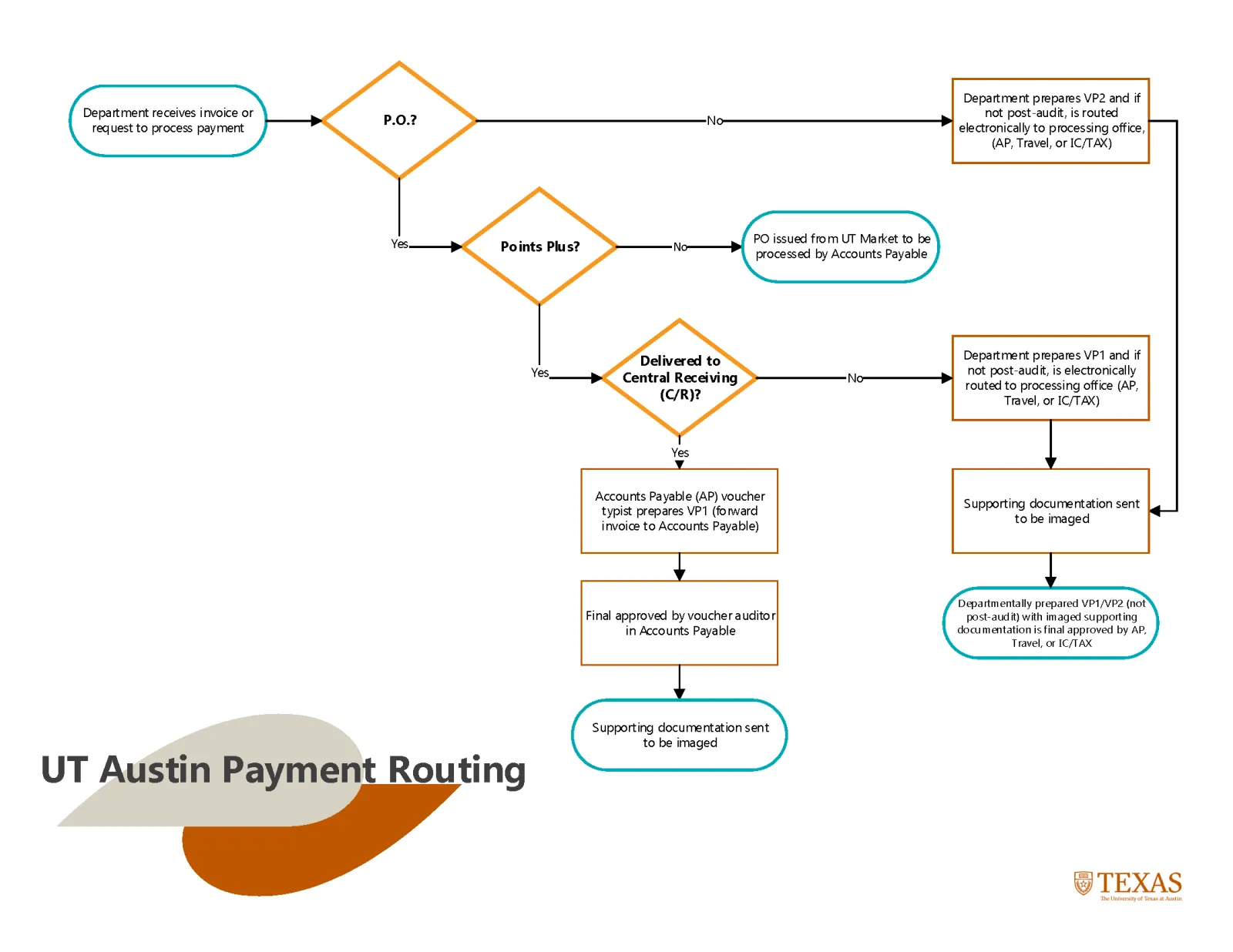
Payments for goods and services received through the Purchase Order process in POINTPlus
Voucher typists in Accounts Payable prepare electronic VP1 payment documents for materials ordered through POINTPlus and delivered to Central Receiving. These VP1 payment documents are reviewed by voucher auditors in Accounts Payable for accuracy, completeness, and compliance with University, State, and Federal guidelines and regulations.
The ordering department initiates the electronic VP1 payment document for materials ordered through POINTPlus and not delivered to Central Receiving. If not a post-payment, these VP1 payment documents route forward electronically to be reviewed by voucher auditors in Accounts Payable, Travel Services and/or Independent Contractor/Tax Services. For more information on post-payments, consult askUS. These payment documents are prepared by departmental personnel for accuracy, completeness and compliance with University, State, and Federal guidelines and regulations.
Payments for goods and services received outside the Purchase Order process:
Voucher auditors in Accounts Payable, Travel Services, and/or Independent Contractor/Tax Services review payment documents prepared by departmental personnel for accuracy, completeness and compliance with University, State, and Federal guidelines and regulations.
Payments for goods and services ordered through the purchase order process in UTMarket
All payments on UTMarket purchase orders are processed by Accounts Payable, not the ordering department.
Document Routing