

UT Amazon Business Prime
About Amazon Business Prime
A centralized Amazon Business Prime account designed to simplify purchasing for campus needs while leveraging Amazon’s wide product selection, competitive pricing and enhanced security for ProCard transactions.
Why Use Amazon Business?
Benefits
This program enhances visibility into transactions, improves reporting and analytics, and ensures secure ProCard usage.
Additional benefits include:
- Free 2-Day Shipping on eligible items
- Sales Tax-Exemption for Qualifying Items (based on ship to address in Texas)
- Business Pricing and Discounts
- Expanded Product Selection for Business customers
- Dedicated Customer Support for Business Accounts
Please note it does NOT include Prime Video, Music, Reading, Amazon Fresh and Whole Foods Market items.
Access
Ensuring Proper Access
Amazon Business is used as a standalone portal with single sign-on. Users authenticate via their UT credentials. Before accessing the site, please make sure your work email address is updated in Workday. This should be the same email address that all eProcurement platforms are using for your authentication including Amazon, UT Market, eShipGlobal or America To Go.
Please do NOT use personal emails for the Amazon Business Prime account at UT.
Please make sure your invitation to join Amazon or your existing Amazon account email matches your work email address in Workday.
To ensure proper access:
- Sign in to Workday.
- Open the Personal Information app on the Home Page
- Select Change > Contact Information
- Click Edit
- Select the Edit icon under My contact information
- Scroll down to the Work Contact Information section, enter your primary work email and mark it as public.
- Click the Checkmark icon.
- Select Submit. The usage will then display Work (Primary).
Once updated, please allow one business day for the information to sync.
If you need assistance, please contact the PPS Systems Admins at purchasing-utmarket@austin.utexas.edu.
Roles and Responsibilities
The PPS Systems Admin team manages the overall Amazon Business account for the University (purchasing-utmarket@austin.utexas.edu) while group administrators are responsible for their respective CSUs.
There are two main roles in the Amazon Business account:
Administrators
An Administrator within a CSU has the ability to:
- Manage members and their roles within the organization (including sending invitations)
- Create groups and subgroups within the organization
- Manage the group’s shared settings (address, payment method), policies and approvals.
- View all orders within the organization
- Provide reporting
Buyers
Buyers are authorized to place and manage orders using the payment methods and shipping address settings previously defined by the group administrator. They also have access to view their own order status and history.
The Finance role may be assigned to Finance Managers for visibility; however group administrators should NOT assign Tech roles. Tech roles are managed exclusively by the PPS Systems Admin Team.
Registration
Already Invited?
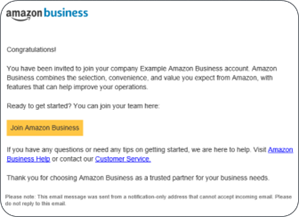
Follow the registration steps in your email invitation.
Need Access?
Email purchasing-utmarket@austin.utexas.edu for assistance. If you know the Amazon administrator in your department, you can send them a request for an invitation. You have 90 days to accept the invitation before it expires.
Amazon Admin Resources
User Roles and Permissions
- User Roles and Permissions
- Manage users – IMPORTANT: Please do NOT remove users from your group when they leave the University. Instead, send their contact information to purchasing-utmarket@austin.utexas.edu and they will move the users to an inactive user folder to ensure that their order history remains within the main account.
- Configure Spend Limits and Approvals
- Approving requests